
What is Microsoft Entra Agent ID? A practical introduction
/ 7 min read
Table of Contents
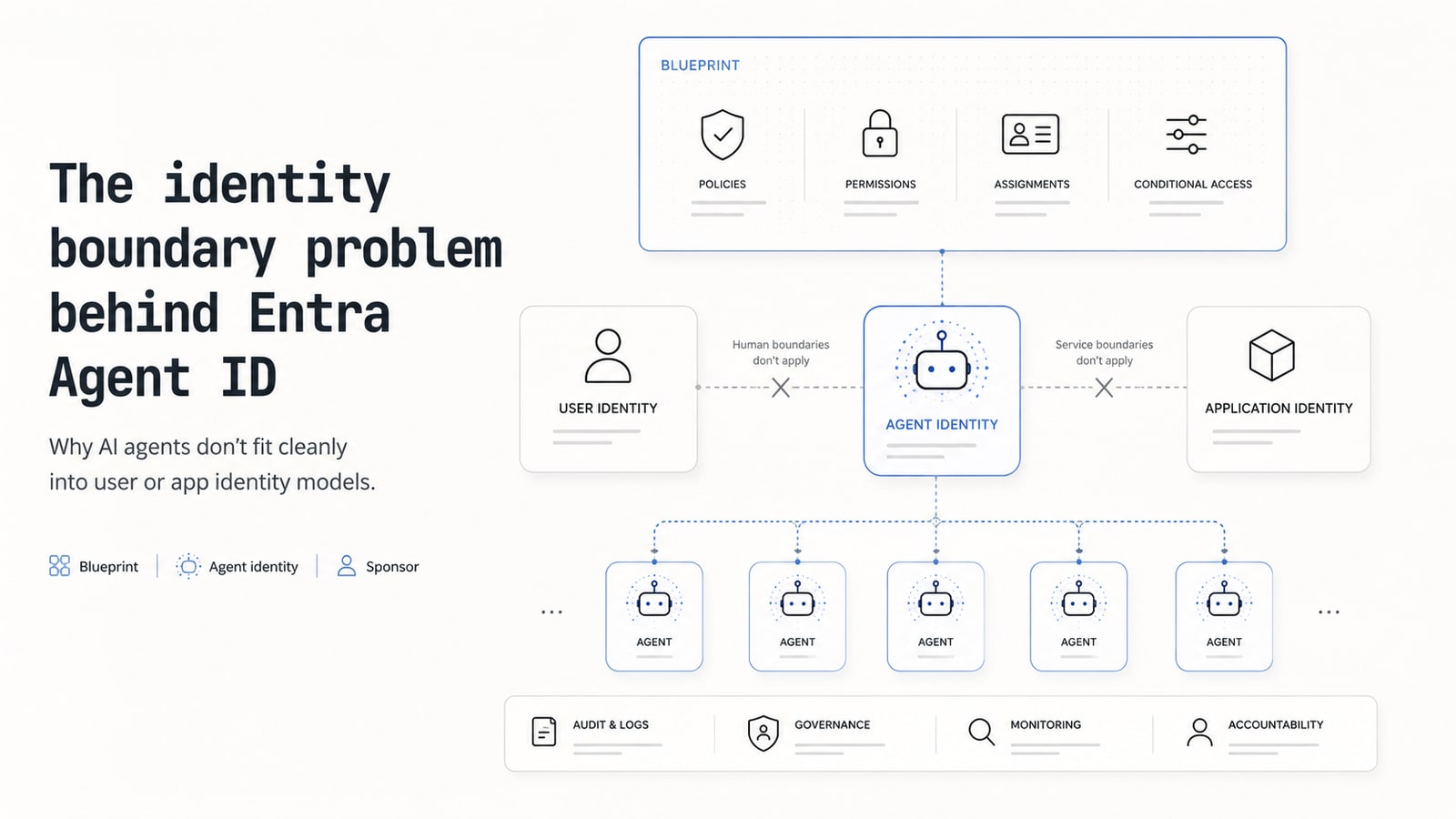
Entra Agent ID is an agent-specific identity model in Microsoft Entra ID — built on Entra’s existing app and service-principal infrastructure, but with agent-specific lifecycle, governance, and audit.
Why? Until this year, an AI agent on the Microsoft stack had to borrow one of two identity shapes and neither fit: register it as an app and treat it like any other background service (stale credentials, coarse audit), or have it act under the user’s identity through ad hoc on-behalf-of (OBO) flows, where the user is visible but the agent as a governed actor is not. Agent ID is the third option.
First in a short series on shipping AI agents on the Microsoft stack — what actually breaks once you’re past the demo.
Why the existing model breaks
Until Agent ID, teams shipping AI agents had two identity choices, and neither fit.
You could give the agent a user account. Doesn’t work — agents can’t approve MFA prompts, don’t have managers, and never get offboarded. Security tooling looks at a 24/7 “user” with no device and flags it as anomalous, even though that’s exactly what the agent should be doing.
You could give it an application identity. This is what most teams actually do — register it as an app, hand it a credential, let it run. It works mechanically but has three problems at scale:
- Volume and speed. Where you might have dozens of background services in a tenant, AI agents arrive in hundreds — sometimes spun up in seconds from Copilot Studio or Foundry by people outside IT. Long-lived secrets in config files are the wrong shape for software that ephemeral.
- Audit blur. Logs show “this app did X” — but you can’t tell which agent acted, on whose authority. Agent traffic looks indistinguishable from any other service-principal traffic.
- Policy collisions. Any rule you write to constrain agents also catches your legitimate background services. Conditional Access can’t target agents as a category, because to the policy engine, they ARE apps.
Agents are neither stable enough to be apps nor accountable enough to be users. They need their own identity type with their own rules. That’s what Agent ID is.
The shape
Identity
Every agent gets an agent identity — a distinct principal type in Entra ID. Under the hood, Microsoft models it as a special service principal, but it’s separate from the traditional service-principal shape teams use for static background apps, and separate from a user account. Entra treats it as agent-specific, with agent-aware authentication, audit, and governance.
But agent identities don’t carry their own credentials. Credentials live one level up, on a blueprint — a template that governs a class of agents. A blueprint can have many agent identities (one per deployed instance); they share the blueprint’s baseline configuration and can inherit its permissions and policies.
Concretely: a “Sales Research Assistant” blueprint defines the permissions (read CRM, call a few public APIs, post summaries to a Teams channel) and a Conditional Access policy.
You might then create separate agent identities from that blueprint per sales rep, region, or sales team so audit trails, permissions, and accountability stay isolated. Same blueprint, many governed identities.
Each agent identity must have a sponsor — a user or group accountable for whether it should still exist. Mandatory, not optional. This is what stops agent sprawl, where nobody remembers what an agent does or whether it’s still needed.
Optionally, an agent identity can have an agent user attached — a child Entra-user object that gives the agent its own mailbox, Teams membership, and SharePoint participation. Skip it if you don’t need M365 service integration.
In the Entra admin center, this lives under a sidebar item simply labeled Agents — distinct from Security Copilot agents, which is a separate Copilot-specific surface.
Underneath, Agent ID builds on the standard identity protocols — OAuth 2.0 and OpenID Connect for authorization and authentication — and supports modern agent patterns such as MCP (Model Context Protocol) for tool calls and A2A for agent-to-agent communication. So Agent ID is not limited to Microsoft-built agents: non-Microsoft platforms can integrate through supported OAuth/OIDC, SDK, sidecar, or federation patterns.
What’s around it
Agent ID isn’t just the identity object — it extends the rest of Entra to agents:
- Conditional Access can target “all agents”, “select agents”, or “agents working on behalf of a user” as first-class conditions.
- Risk detection evaluates agent behavior with agent-aware signals — distinct from how it scores human users.
- Some permissions are off-limits by design. Privileged directory roles (Global Administrator, Privileged Role Administrator, User Administrator) and tenant-scoped Graph permissions (
Application.ReadWrite.All,RoleManagement.ReadWrite.All,User.ReadWrite.All,Directory.AccessAsUser.All) cannot be granted to an agent identity — the platform refuses, regardless of who’s doing the assigning. - Microsoft Purview extends to agent activity with controls adapted for agent scenarios — for example, distinguishing high-volume retrieval for a legitimate RAG workflow from risky data access.
- Microsoft Defender for AI adds runtime detection: jailbreak attempts, prompt injection, malicious tool invocations.
- An agent registry inventories registered and discovered agents across Microsoft and non-Microsoft platforms — searchable, like a global address list for non-humans.
- A containerized SDK (Microsoft Entra SDK for Agent ID) ships as a sidecar service that handles OAuth token acquisition, validation, and downstream API calls over HTTP — so your app stays polyglot (Python, Node, Go, .NET, etc.) without re-implementing auth in every language.
When does this matter for you?
Three rough stages. Ignore everything that doesn’t apply yet.
| Stage | What to do |
|---|---|
| Prototyping a single agent for yourself or a small team | You can mostly ignore Agent ID. Foundry and Copilot Studio provision identities for you; the defaults work. Come back when you publish or when something stops working. |
| Shipping one agent to production | This is where you start to care. Keep the mental model straight — blueprint holds credentials, agent identity is the principal — and budget time to debug a few authentication surprises the first time you wire it up. |
| Many agents across the org | This is where the model pays off. One Conditional Access policy on the blueprint protects every agent created from it. One blueprint governs the class — each identity keeps its own audit trail and accountable sponsor. Disable the blueprint and authentication stops for the whole class. Plan your blueprint taxonomy before you have fifty agents created ad-hoc — cleaning that up later is the kind of work nobody wants to own. |
Multi-tenant publishing (an ISV shipping an agent into other organizations’ tenants) adds an extra layer — publishing tenant vs. consuming tenant, consent flow. Future post.
Take-home
If you only remember two things:
More posts in this series will follow — each narrow on purpose, on the part the docs leave out: what actually breaks in practice, and what to do about it.